Process Manufacturing ERP Features Designed to Meet Your Needs
With a comprehensive set of native capabilities that are critical to the business needs of batch and process manufacturers, Deacom ERP provides a level of Hyper-Tight Process Control™ that goes beyond many general-purpose ERP systems used in Australia and New Zealand.

Minimise inventory handling and maximise your production output
Deacom's built-in supply chain planning tools help you centrally manage critical manufacturing processes, from material requirements planning (MRP) to sales and production forecasting. This includes optimising the use of manufacturing equipment, maximising fill rates through inventory and production planning, and centralising business intelligence reporting for purchasing and manufacturing planning.
Manage production, ensure quality, and track labour
Ensure the success of your business with manufacturing operations capabilities that cover the planning, execution and control of your manufacturing processes. By having these native to your ERP, you can be confident that you’re producing high-quality products that meet customer demand.
Enable strict process control within your warehouse
Streamline your manufacturing and distribution centres with real-time inventory management and warehousing features that support scalable and repeatable business processes. Track best-before dates, batch numbers, quantities and weights with GS1-128 barcodes, to support warehouse efficiency and reliable lot tracking.
Manage sales orders, pricing rules, and financial reporting
Place sales orders, set up unique pricing models and create intercompany transfers with real-time impacts on MRP and reporting. Access a wide range of financial reports beyond balance sheets and profit and loss statements to help you run your process manufacturing business.
Work smarter with Practical AI built for batch manufacturing
Deacom's Practical AI is embedded directly into the ERP interface, helping your team work faster with less effort. AI Invoicing helps automate accounts payable by reading invoice PDFs and importing the data directly into Deacom, which reduces manual entry and the risk of keying errors. AI Assistant provides on-screen guidance and field definitions based on Deacom help documentation, so users can find answers where they work instead of searching through manuals or asking around.
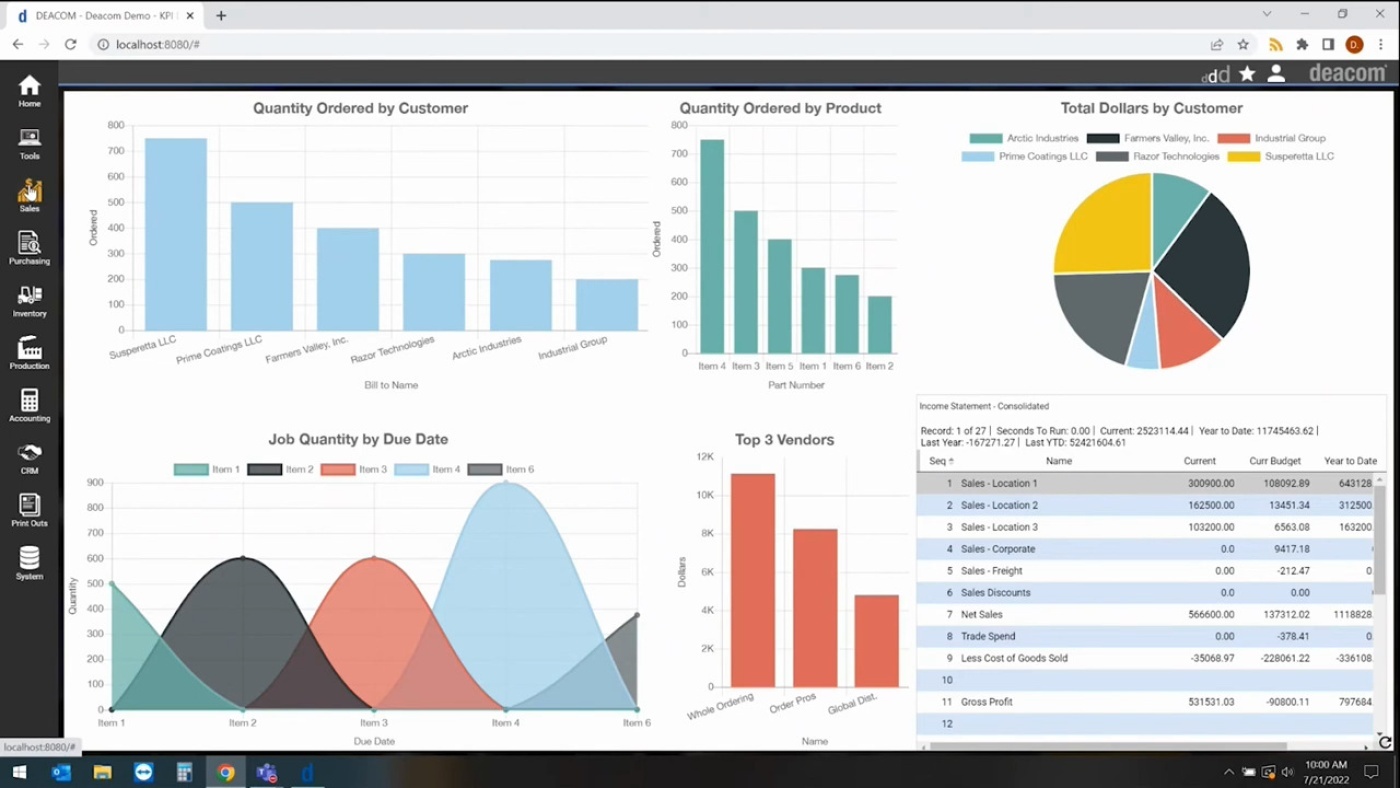
A seamless user experience
This video provides a brief overview of the user experience of Deacom's ERP software, and shows the range of BI dashboards available to users. The video also demonstrates how users can drill down into specific source transactions and move into different areas of the system that are relevant to their business processes, such as sales, purchasing and inventory management.
Enforce quality control measures in every step of the process
With Deacom ERP software, you can set up configurable quality control checkpoints that cover the entire product lifecycle, from formulation through to shipment. QC tests can be built into key business processes such as when raw materials are received on purchase orders, when finished goods produced on production jobs, or when previously sold products are returned.
Generate documents that meet regulatory requirements
Leverage Deacom's document creation and management features to keep track of documents like vendor scorecards, item specifications, customer requirements, and signed BOL’s for sales orders. Food and beverage manufacturers can generate certificate of analysis and nutrition information panels, while those manufacturers dealing in hazardous materials can ensure the proper Globally Harmonised System (GHS) Labels and Safety Data Sheets (SDSs) are created for their finished goods.
Implement a seamless user experience with a single login
No matter which part of the system your team is using, they only need to worry about logging into one system and working within one interface. Watch this video to get a brief overview of our Deacom ERP user experience and see various BI dashboards that are available to users. The video also demonstrates how users can drill down into specific source transactions and access different areas of the system that are relevant to their business processes, such as sales, purchasing, and inventory management.
“With Deacom, we can take our inventory control to a specific shop location and relieve material used in a batch more efficiently than ever before.”
“When I look at the speed and efficiency with which our people do their jobs now with Deacom, the difference is night and day.”
“Partnering with Deacom has resulted in far more than we expected. They took the time to learn what our company needed and committed to delivering it.”